
First-order incentives
Trade a percentage off for an email — classic ecommerce list growth on Wix Stores.
Wix promotions
A Wix discount popup highlights a code or sale without burying it in a banner nobody reads — timed, targeted, and easy to dismiss.
Use them for launches, flash sales, and first-order incentives — not every sitewide message.
Trade a percentage off for an email — classic ecommerce list growth on Wix Stores.
Pair URL targeting with a clear end date in the copy so urgency feels real.
Save the stronger discount for exit-intent so early visitors see a softer ask first.
Promo popups work when the code is real, the audience is scoped, and urgency is honest.
A Wix discount popup should do one job: make the offer impossible to miss for the people who should see it. That usually means a modal for the primary promo (often with email gate) or a bar for an ongoing free-shipping / sale reminder. Trying to do both in one creative muddies the CTA.
Create the discount in Wix Stores (or your commerce settings) first, then mirror the same code in the popup. Mismatched codes are a common support ticket and an instant trust hit. Scope campaigns with URL targeting — homepage and collections for a sitewide sale; product URLs for a category promo.
Reserve stronger codes for exit-intent or email signup. Soft sitewide bars can carry free shipping thresholds. Fake ever-green “ends in 15 minutes” timers hurt more than they help; use real sale windows and unpublish when they end.
“Create a two-column discount popup for a Wix store. Left: product lifestyle image. Right: headline Weekend sale — 15% off, show code SAVE15 in a dashed chip, short supporting line, CTA Shop the sale. Bright but on-brand, not cartoonish.”
Common mistakes
Code chip, short benefit line, and a single claim CTA.
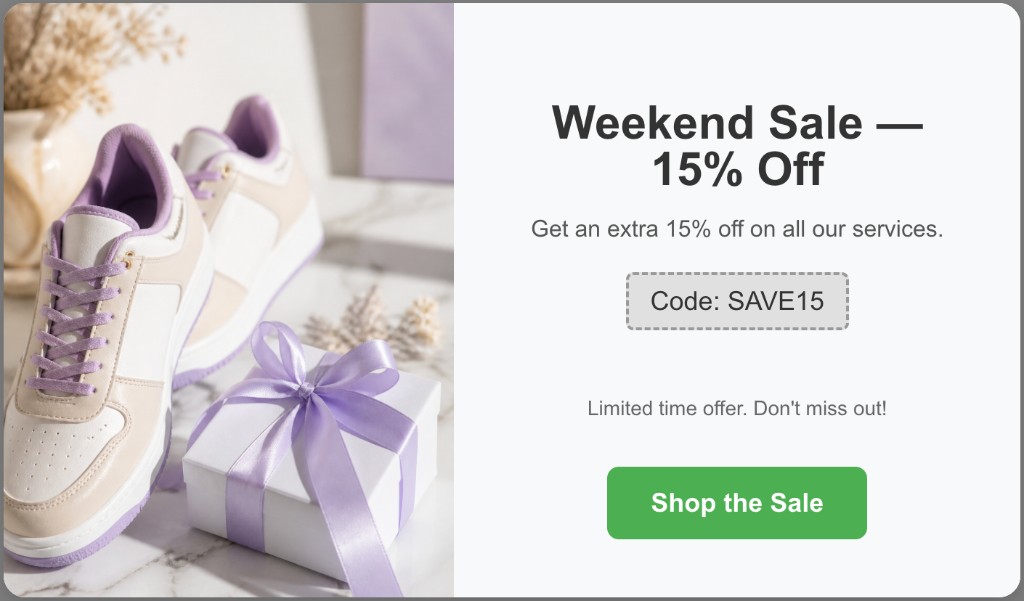
Illustrative Popup Wizard campaign concept
Build the offer, set when it appears, publish from your dashboard.
Add the app from the Wix App Market and create a new campaign.
Prompt AI with the discount amount, code, and CTA — or enter the code and copy yourself in the manual builder.
Time delay for browsers, exit-intent for abandoners, or specific product/collection URLs.
Use conversions (leads + CTA clicks) plus your Wix/commerce reports to judge the promo.
Popup Wizard does not use a template library. You create campaigns with AI from a prompt, or build a simple bar or modal manually and adjust image vs content position.
Describe the goal, layout, and CTA in a short prompt. Popup Wizard drafts copy and layout you can refine in the dashboard before publishing.
Write your own headline, body, and CTA. Choose bar or modal, then place the image left or right of the content — ideal for simple announcements and free-shipping bars.
Fast offer creation with the targeting controls promotions need.
Describe the sale once; tweak tone and colors to match your Wix theme.
Use a modal for a hero offer or a bar for a persistent free-shipping reminder.
Cap how often the discount appears so shoppers are not trained to wait for popups.
Keep exploring the Wix popup cluster — or return to the main Wix app page.
Common questions about wix discount popup and Popup Wizard.
Install from the Wix App Market and publish a discount campaign in minutes.