
Recover abandoners
Show a discount, free shipping reminder, or newsletter ask only when exit intent is detected — not on first paint.
Wix exit-intent
A Wix exit intent popup shows one last offer when someone moves to close the tab or hit back — your best shot at an email or discount conversion.
Timing beats volume. One well-timed message outperforms a popup that fires on every page load.
Show a discount, free shipping reminder, or newsletter ask only when exit intent is detected — not on first paint.
Pair exit-intent with frequency capping so returning visitors are not chased by the same modal every visit.
Limit exit-intent to product, cart, or blog URLs so the offer matches the page they were about to leave.
Exit-intent is not a growth hack for every page. Use it where leaving has a clear cost — and keep the ask proportional.
On Wix, most “popups don’t work” complaints come from campaigns that fire too early, too often, or with a weak offer. Exit-intent flips the timing: the visitor already signaled they were done browsing, so a short recovery message feels less like an interruption and more like a last useful option.
Built-in Wix Lightboxes cannot detect true exit intent. If you need that trigger, you install a Wix App Market popup app, create a campaign, and enable exit-intent in targeting — ideally with URL rules so product or cart pages get a different ask than a blog post.
The offer should match the page they were leaving. A 10% welcome code on a product page is coherent. The same code on a careers page is noise. Pair exit-intent with frequency capping (for example once per visitor or once per week) so returning customers are not trained to wait for a popup every session.
“Create a two-column exit-intent popup for a Wix store. Left: lifestyle product image. Right: headline Wait — before you go, short body offering 10% off first order for email signup, email field, CTA Get my code, small No thanks link. Calm premium tone, not flashy.”
Common mistakes
Cursor drifts toward the close control — the modal appears before the session ends.
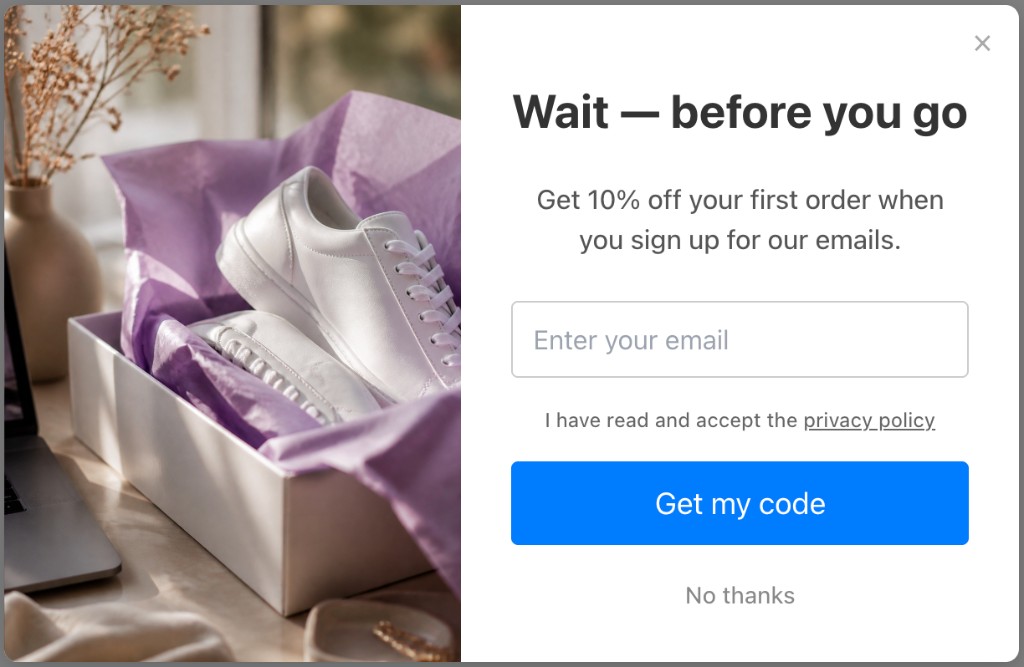
Illustrative Popup Wizard campaign concept
Install from the App Market, create a campaign, then enable exit-intent in targeting.
Add Popup Wizard from the Wix App Market and open it from your Wix dashboard Apps list.
Use AI to generate an exit offer (email + discount is common), or build a modal manually with your own copy.
In targeting, turn on exit-intent detection. Optionally add URL rules, device filters, delay, and frequency caps.
Publish the campaign and watch impressions, dismissals, and conversions in analytics — refine the offer after enough traffic.
Popup Wizard does not use a template library. You create campaigns with AI from a prompt, or build a simple bar or modal manually and adjust image vs content position.
Describe the goal, layout, and CTA in a short prompt. Popup Wizard drafts copy and layout you can refine in the dashboard before publishing.
Write your own headline, body, and CTA. Choose bar or modal, then place the image left or right of the content — ideal for simple announcements and free-shipping bars.
Lightboxes are fine for static welcome messages. Exit recovery needs app-level triggers.
Native App Market install plus the triggers you need for recovery campaigns.
Enable per campaign — no custom Velo code or third-party scripts.
Prompt for a last-chance discount or list signup and refine colors to match your Wix brand.
Up to 5,999 impressions/month and one AI campaign — enough to validate exit-intent before upgrading.
Keep exploring the Wix popup cluster — or return to the main Wix app page.
Common questions about wix exit intent popup and Popup Wizard.
Install Popup Wizard from the Wix App Market and launch a recovery popup in minutes.